

Description
Real-Time AsciiDoc Editor & Viewer
Overview
The software is a browser-based tool designed for viewing and editing AsciiDoc files directly within a web browser. It operates entirely locally, ensuring that no file data is transmitted to external servers, which enhances privacy and security for users handling sensitive documentation. This makes it ideal for developers, technical writers, and content creators who rely on AsciiDoc for structured text formatting. The application supports immediate editing and real-time preview, enabling users to see changes as they type. It is particularly useful for those who need to quickly review or modify AsciiDoc content without installing additional software. The tool integrates with Google Drive, allowing users to access and edit files stored in their cloud account directly from the interface. This feature streamlines workflows for users who manage documents across multiple devices. The developer did not provide additional information about the background or development history of the application.
Key Features & Capabilities
- Local-Only Operation – All file processing occurs within the user’s browser. No data is sent to remote servers, ensuring privacy and compliance with data protection standards.
- Real-Time Editing and Preview – Changes to the AsciiDoc source are instantly reflected in the rendered output, enabling efficient content creation and validation.
- Google Drive Integration – Users can select and edit AsciiDoc files directly from their Google Drive account, facilitating seamless access and file management.
- File Import from Local Storage – Supports direct upload and editing of AsciiDoc files from the user’s computer, providing flexibility in workflow.
- Simple, Intuitive Interface – Designed for quick onboarding, the interface requires no prior training and allows users to start editing immediately.
These capabilities are especially beneficial for technical documentation teams, open-source contributors, and educators who frequently work with markup languages. The ability to edit files without installation makes it accessible from any device with a modern browser. The tool is particularly effective for rapid prototyping, collaborative writing, and on-the-go content updates.
User Interface, Workflow & Performance
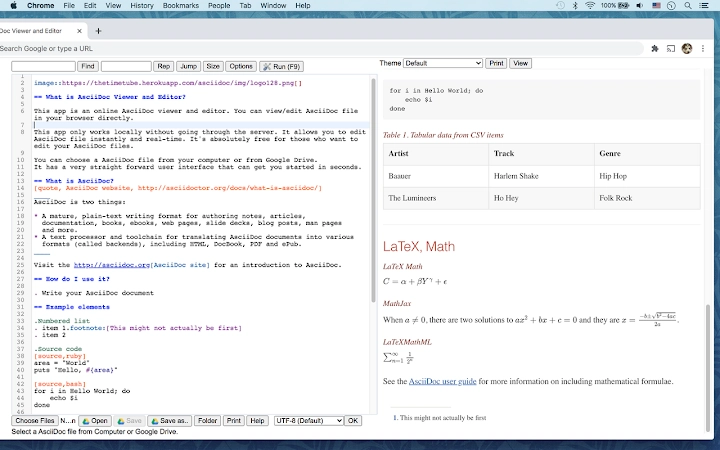
The user interface is minimalistic and focused on functionality, with a split-screen layout that displays the AsciiDoc source code on one side and the rendered output on the other. Navigation is straightforward, relying on standard browser controls and intuitive file selection prompts. Users can switch between local files and Google Drive with a simple click, reducing context switching during editing sessions. The workflow is optimized for speed, allowing users to open, edit, and save files in a few seconds. The developer did not specify resource usage details, but based on general behavior of browser-based applications, performance is expected to be stable on modern systems. No reported issues with stability or responsiveness were mentioned. The application does not require background processes, which contributes to low system impact during use.
Compatibility & System Requirements
The software is compatible with Windows, Mac, and Linux operating systems, making it accessible across major desktop platforms. It operates entirely within a web browser, so no native installation is required. The application has a footprint of 15 MB, which is typical for browser-based tools with moderate functionality. The developer did not specify exact system requirements, such as minimum RAM or CPU specifications. Compatibility information was partially provided, with no mention of older operating system versions or legacy browser support. Users should ensure their browser is up to date to access all features.
Pros and Cons
Pros
- Runs locally without uploading files to servers
- Real-time preview for immediate feedback
- Seamless Google Drive integration for file access
- Simple interface suitable for beginners and experts
- Free to use with no licensing restrictions
Cons
- No offline mode available for Google Drive files
- Dependent on browser functionality and internet connection
- Limited to AsciiDoc format only
- Exact performance metrics not provided
- Does not support file export in multiple formats
FAQ Section
Is this tool safe to use with sensitive documents?
Yes, the software operates entirely locally in the browser. No file data is sent to external servers, making it secure for handling confidential or sensitive content.
Can I use this tool without an internet connection?
While the application runs in the browser, access to files stored in Google Drive requires an active internet connection. Local file editing can be performed offline if the file is already loaded, but full functionality depends on network availability.
Does it support file export?
The current version does not include export functionality for saving files in other formats. Users can only edit and view AsciiDoc content within the tool.
Is there a desktop version available?
The software is a browser-based application and does not have a dedicated desktop installation. However, it can be added to the desktop via browser shortcuts for easier access.
How often are updates released?
Update frequency was not specified by the developer. Users are advised to check the official website periodically for the latest version.
Final Thoughts
This browser-based AsciiDoc editor offers a secure, fast, and straightforward solution for users who need to view and edit AsciiDoc files without installing software. Its local-only operation ensures data privacy, while the real-time preview and Google Drive integration enhance usability. The simple interface makes it accessible to both technical and non-technical users. Although it lacks export options and full offline support, its core functionality is well-executed and reliable. For anyone working regularly with AsciiDoc, this tool delivers a lightweight yet effective editing experience. Download the latest version today.
Guides & Tutorials for AsciiDoc Viewer and Editor App for Chrome
How to install AsciiDoc Viewer and Editor App for Chrome
- Click the Preview / Download button above.
- Once redirected, accept the terms and click Install.
- Wait for the AsciiDoc Viewer and Editor App for Chrome download to finish on your device.
How to use AsciiDoc Viewer and Editor App for Chrome
This software is primarily used for its core features described above. Open the app after installation to explore its capabilities.
User Reviews for AsciiDoc Viewer and Editor App for Chrome 0
No reviews found





